
What Microsoft 365 licence does my business need?
For most small businesses the honest answer is a mix. Split your team into three groups: people who only need email, Teams and browser apps; people who need the desktop Office apps; and people whose accounts or laptops carry more risk. Then match each group to Microsoft 365 Business Basic, Standard or Premium. All three business plans are designed for organisations with up to 300 users.
What each business plan gives you
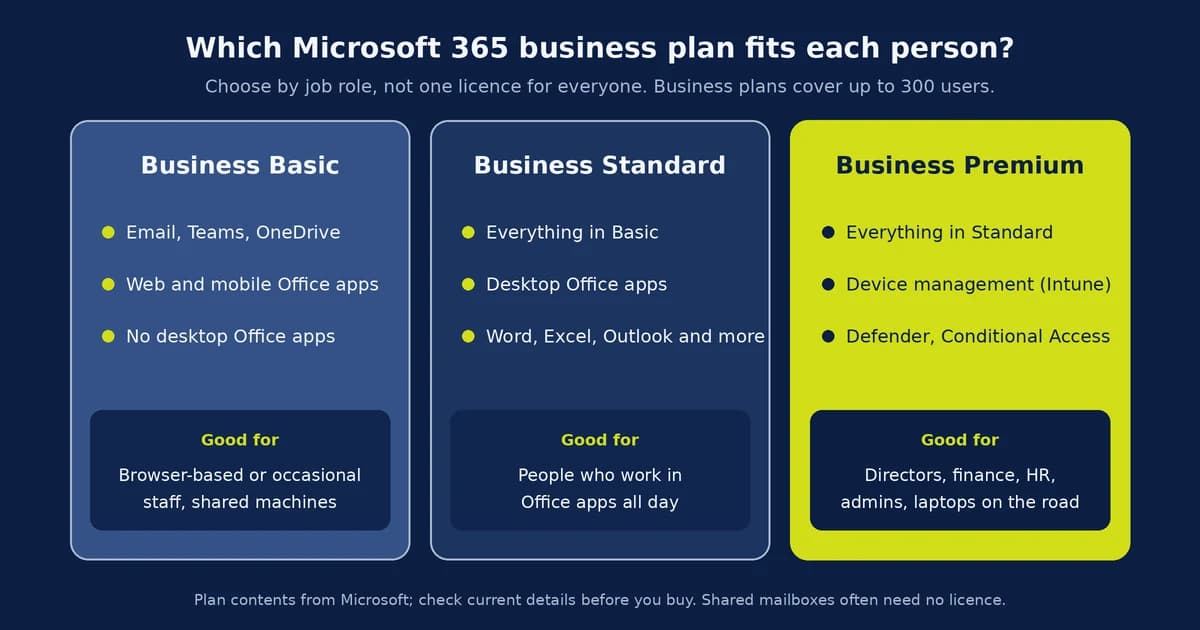
Business Basic covers business email, Teams, OneDrive and SharePoint, and the web and mobile versions of the Office apps, with 1 TB of cloud storage per user. It does not include the installed desktop apps.
Business Standard adds the desktop versions of Word, Excel, PowerPoint, Outlook and the other Office apps, on top of everything in Basic.
Business Premium adds the security and device tools: Microsoft Entra ID P1 for Conditional Access, Microsoft Intune for managing laptops and phones, Microsoft Defender for Business for device protection, Microsoft Defender for Office 365 Plan 1 for email threats, and information protection features.
Every business plan includes security defaults, which turn on multi-factor authentication for your users. That is a good start, but it is not the same as the finer controls Premium gives you.
If someone needs the desktop apps but not company email, Microsoft 365 Apps for business is another option. It is rarely the right choice for a whole team, because most staff need a business mailbox as well.
The quick version
Choose Business Basic when the person works mainly in a browser, needs company email, joins Teams meetings and keeps files in OneDrive or SharePoint. It usually suits occasional staff, volunteers and people using shared machines, as long as they do not need the installed Office apps.
Choose Business Standard when the person works in Excel, Outlook or Word all day and wants the full desktop apps on their computer. This is the normal choice for most office staff.
Choose Business Premium when the account or device carries more risk: directors, finance, HR, anyone with admin rights, staff who take laptops out of the office, and anyone working with confidential client data.
A typical five-person office might end up with three Standard licences for staff in Excel all day, one Basic licence for a part-time admin role, and one Premium licence for the director whose account can approve payments, see HR files and reset passwords.
Why the cheapest licence is not always cheaper
A cheap licence is fine when it matches the job. It gets expensive when it quietly creates workarounds: staff emailing files to personal accounts, saving documents on their own laptop because SharePoint is not set up properly, or reusing weak passwords because nobody has turned on the basics.
The basics that protect a small business are well known: strong, separate passwords, two-step sign-in on every account, regular backups, up-to-date devices and protection against malware. Microsoft 365 can support a lot of that, but only if it is set up properly. The licence gives you the tools; the setup decides whether they actually protect your business.
For Microsoft 365, that turns into practical questions: who can see company data, what happens if a laptop is lost, can you remove company files from a leaver's phone, and would you notice a risky sign-in before it became a problem?
Shared mailboxes and other accounts
Addresses like info@, accounts@ or enquiries@ do not always need a paid licence. A shared mailbox normally does not need its own licence while it stays within 50 GB and does not need extra features, but the people who use it still need their own licensed mailboxes. Our guide to whether a shared mailbox needs a Microsoft 365 licence walks through the checks before you remove one.
Look out for leavers too. An account that still holds a licence months after someone has gone is money spent on nothing, and an account nobody watches is a security risk.
A simple way to map licences
Start with the job role, not the price list.
List everyone in the business and write down three things next to each name: do they need the desktop Office apps, do they handle money, personal data or admin rights, and do they use a laptop or phone outside the office? Two "no" answers to the last two questions and no need for desktop apps points to Basic. Desktop apps with lower risk points to Standard. Any "yes" on the risk questions is worth a serious look at Premium.
Then check the device picture. Personal phones and laptops are convenient, but they blur the line between company data and personal kit. Premium's device management matters more when staff work from home, take phones on the road or use devices that could be lost, stolen or shared.
Finally, check whether you already pay for separate security tools. If you buy device protection, email filtering and device management elsewhere, Business Premium may replace some of that spend, because it includes Defender for Business.
Mistakes we see when Microsoft 365 has grown on its own
The most common mistake is having too many global admins. Admin accounts can change the whole setup, reset users and reach sensitive areas, so they need stronger controls than a normal mailbox.
The second is mixing personal habits with business data. OneDrive and SharePoint are useful, but they need a sensible folder structure and permissions. Otherwise you end up with a mess that looks modern but behaves like the old shared drive everyone hated.
The third is buying licences once and never reviewing them. Roles change, people leave, new tools arrive, and the licence mix goes stale.
Review your licences before you renew
The best time to fix your licence mix is before the renewal date, not after. Compare the licences you pay for with the people who actually use them, check when a reduction can take effect, and agree who signs off any change. Our Microsoft 365 licence review checklist sets out exactly what to check.
What about Personal, Family, Enterprise and Education plans?
Microsoft 365 Personal and Family are consumer plans for home use. They do not give you business email on your own domain, central admin or the business security controls, so they are not a good fit for staff accounts.
- Business plans (Basic, Standard and Premium) are built for organisations with up to 300 users.
- Enterprise plans (such as E3 and E5) have no 300-user cap and add advanced compliance and security features that most small firms do not need.
- Education plans are only available to eligible schools, colleges and universities.
When to speak to us
Talk to us before a migration, before renewing a large batch of licences, or when you are not sure whether Business Premium is worth it. We can review your setup, map licences to real job roles, remove waste, tighten security and make sure Microsoft 365 works the way your team does.
We look after businesses in Rochdale and across Greater Manchester, including the bits that sit around Microsoft 365: device setup, backups, Wi-Fi, phones, cyber security and day-to-day IT support in Rochdale. The licence is only one part of the picture; the setup is what stops it turning into an expensive address book.
Book a free IT audit — a no-obligation review of your current IT setup, including your Microsoft 365 licences.
Related reading
Microsoft 365 support · Review Microsoft 365 licences before renewal · Does a shared mailbox need a licence?