What is managed WiFi for business?
Instead of a router you set up once and forget, we plan, install and look after your Wi-Fi for you. That includes updates, monitoring, security settings and changes when your team or premises change.
Business Wi-Fi that is planned, installed and looked after for you, with separate networks for staff, guests and back-office devices.
Slow or patchy Wi-Fi costs you time every day. Calls drop, card machines lose their connection, and staff end up crowding around the one desk near the router. In many offices the problem is not the broadband line but the Wi-Fi itself: a single router doing too much, access points in the wrong place, thick walls, or visitors sharing the same network as your staff.
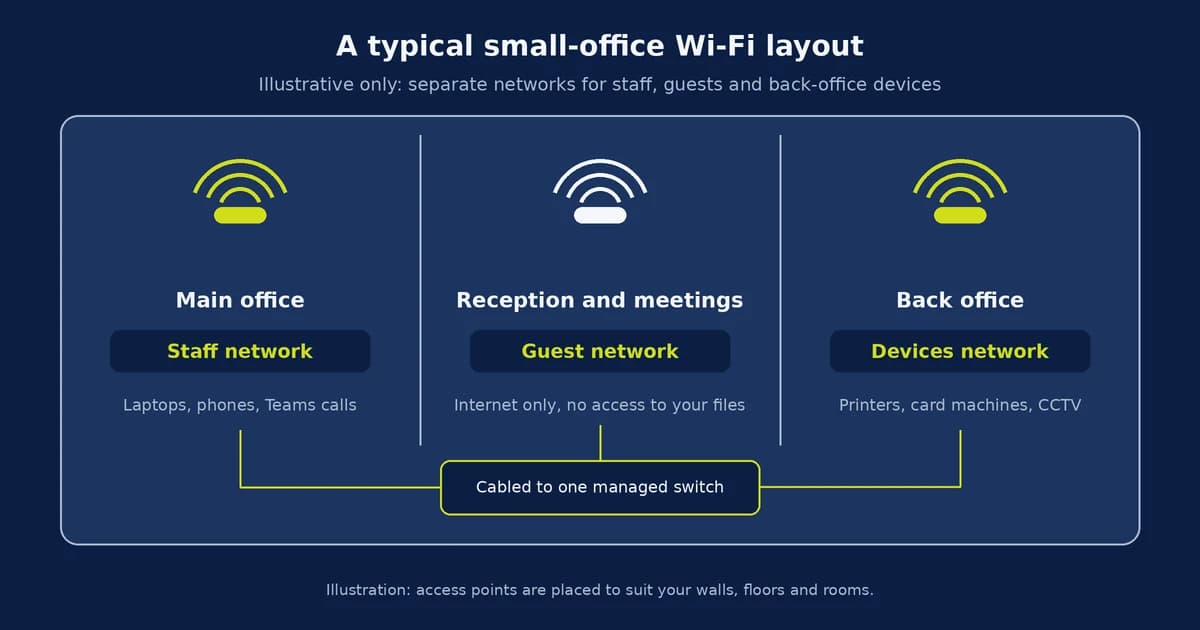
Our managed WiFi service for business fixes that properly. We check your premises, plan where access points should go, install business-grade equipment and set up separate networks for staff, guests and devices like printers and card machines.
Then we look after it. We keep the equipment updated, watch for problems, change access when people leave and adjust the network when your team or layout changes, so Wi-Fi stops being something you have to think about.
Get StartedIt’s always easier to chat things through on the phone, just give us a call. We’d love to help.
Let’s ChatFrom the first look at your premises to day-to-day care, one team handles it.
We look at where signal drops, where people actually work and what needs a cable instead, then plan access points around your walls, floors and rooms.
Access points cabled back properly and set up so laptops and phones move between them without dropping calls.
Visitors get internet access without being able to see your computers, printers, tills or files.
Explore this service: Separate guest Wi-FiWe monitor the network, apply updates, manage passwords and fix problems, often before anyone notices.
Already have Wi-Fi that struggles? We find the cause, whether that is placement, interference, old equipment or the internet line.
Explore this service: Fixing Wi-Fi that keeps droppingUse our checklist of what a managed Wi-Fi service should include before you sign anything.
Explore this service: Comparing providers?Practical guides to help you work out what is wrong with your Wi-Fi and what a good service looks like.
Tell us what is going wrong and how your premises are laid out. We start with a free IT audit.
We look at coverage, how many people and devices connect, and which equipment is better on a wired connection.
We agree the plan with you, then install and test the access points with as little disruption as possible.
We monitor, update and adjust the network as your team grows or moves around.
We are a managed IT provider, so your Wi-Fi is looked after by the same team that supports your computers, Microsoft 365 and security. Nobody passes the problem between suppliers.
We are Cyber Essentials certified, rated 5.0 on Google, and have looked after local businesses from our base in Milnrow, Rochdale, since 2021.
Instead of a router you set up once and forget, we plan, install and look after your Wi-Fi for you. That includes updates, monitoring, security settings and changes when your team or premises change.
Often it is the Wi-Fi. If devices near the router are fine but other rooms are slow, coverage or placement is usually the cause. Our free IT audit can tell you which it is before you spend anything.
Yes. We set up a separate guest network so visitors get internet access without being able to reach your computers, printers, tills or files.
Not always. We check what you already have first and tell you plainly whether it can be kept or needs replacing.
These are some of the most common reasons for weak signal. We plan access points around them, and use a wired connection where it is more reliable than wireless.
Yes. We keep the equipment updated, use strong encryption and passwords, keep guest traffic separate and remove access when staff leave.
It depends on the size and layout of your premises and what you already have. Book a free IT audit and we will explain what is involved before you commit.
Book a free IT audit — a no-obligation review of your current IT setup, including your Wi-Fi.
Fed up with Wi-Fi that drops out? Book a free IT audit — a no-obligation review of your current IT setup.
No obligation
Get Started
Want to talk it through? Book a free IT audit, or see our managed IT support and building IT infrastructure services.
A free, no-obligation review of your current IT setup. We look at your devices, Microsoft 365, backups and security, and give you a plain-English list of what needs attention first.
Book a free IT auditReviews